Not only that but he'll gladly guide you to having a brilliant attitude too!
"Nothing has any meaning at all other than the meaning you give it" - Bob Allwright
Press Play - turn on your speakers and turn up your volume
What that means to you the listener is that you are about to be shown a sample of thoughts, ideas and skills that some of the most successful people in the world use on a daily basis.
Bob Allwright is the guest expert on media host Michael Searles' popular radio program Interviews with Experts.
Bob is one of Australia's leading speakers and trainers in personal development and advanced learning techniques. He is also author and self-publisher of the book by the same name, The Little Guide to a Brilliant Attitude.
I have a copy of Bob's book sitting on my bedside table. I'm thoroughly enjoying the read. And can I tell you something? I actually picked up a few new ways of looking at things.
His tips really work. I felt my attitude grow from good to better to brilliant.
Bob's inspiring personality and friendly nature have him in high demand at schools and corporate organizations across Asia Pacific.
The Little Guide to a Brilliant Attitude interview with Bob Allwright is essential listening (running time 21:56).
And after you listen to the audio interview on this page go and grab your own copy of Bob's brilliant little book.
Like to learn some media interviewing tips from a media expert?
Ted Ryan has forty or more years as a media journalist, radio and television broadcaster and race caller.
Sports fans will recognize Ted Ryan's voice from over fifteen years of calling The Melbourne Cup for television, radio and his written journalism for press media. That is only a part of Ted's forty years sports media biography.
Press Play - turn on your speakers and turn up your volume
Listento Interviews with Experts host Michael Searles talk with Ted Ryan in the streaming audio interview above (29:51 minutes) and you will pick up some pearls of wisdom from Ted about how to interview others for media.
Ted Ryan is an A-Grade Journalist and a respected member of Australian media.
He has worked with all the Australian commercial television stations (GTV9, HSV7, Channel10, Sky), the highest rating sports radio stations (3UZ/Sports 927), on-course racing broadcasts across horse racing, trotting and greyhound racing.
The names of sporting and media personalities known to and by Ted Ryan reads like a Who's Who of Australian media history and these are some of the names mentioned in the recorded interview playing above:
- Bert Newton
- Phillip Brady
- Bruce Mansfield
- Gary Mac
- Bryan Martin
- Greg Miles
- Brian Markovich
- Peter Hitchener
- Tony Jones
- Brendan Delaney
- Joe Frazier
- Frankie Dettori
- Bert Bryant (dec.)
- Clarke Sinclair (dec.)
- Ray Benson (dec.)
Ted Ryan shares his vast experience interviewing famous name sporting greats, talking to camera, reading screen teleprompters, voice control, breathing and more to help media beginners learn how to conduct a media interview.
Ted Ryan also writes a column today for one of Michael Searles favorite newspapers, the Melbourne Observer.
Looking for a professional to run the show? Contact Ted Ryan: E-Mail - ted.ryan@optusnet.com.au Mail - PO Box 2179, North Ringwood, Victoria, Australia 3134
Media Tips from an Australian Sports Media Veteran
The good news relates to the email signature which up until now would only be plain text - you could not save your signature in the Settings window with html or WYSIWYG formatting.
What that used to mean was a pre-saved email signature without images, active URL's or links.
Formatting of your signature was required every time you composed a new email.
Not any more! Go to your Gmail account and click on the Settings link.
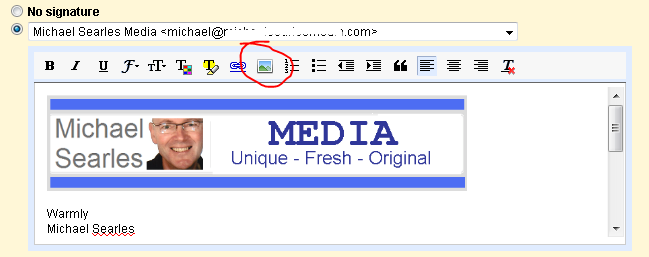
Here you will now see a new editor field under Signature: with all your regular WYSIWYG features . . .
The small arrow circled on the right in the image above is used when you may have multiple email accounts linked to your main Gmail account.
Click this arrow and the drop down list of your email account names will appear and you can pre-set a signature for each email account name. Cool!
You can use the WYSIWYG editor and format your signature with all the usual formatting and links AND include a pre-saved image in your signature too!
What that now means is that you can build some image consistency and self-branding with the emails you send.
I would encourage you to consider creating an image that best represents you, your products or your business and add it to either the top or the bottom of your saved email signature.
This is what mine now looks like and you can see that all I have done is lift the banner from my media site and then saved that image into the signature editing field in the 'Settings' dashboard of my Gmail account - then saved it.
Now, when ever I compose a new email with my Gmail account the pre-loaded signature file is included complete with image and linked URL's.
It's a real time saver and a great move by Google.
Here's a cool site to find out what site gets the most tweets in a 24 hour period but there's lots of other handy stats for the people who (like me) live with numbers.
Go there right now and you will discover that in the past 24 hours YouTube.com has been shared in 10,808 and is at the top position of thirty sites listed in total.
Facebook.com is down at number seventh position with its URL shared in 4,008 tweets on Twitter in the past 24 hours (as at 5:09PM, July, 14, Australian Eastern Standard Time, source www.realurl.org).
The other handy tool at RealURL.org is the short URL converter.
Ever get an email with a short URL like tinyurl.com/xxxx or bit.ly/xxxx and want to know what the destination URL or domain is before clicking?
All you need to do is grab (copy) the short URL and paste it directly into the field at RealURL.org and 'presto' - the full un-shortened URL is revealed.
It really is the URL shortening process in reverse.
Here's one I prepared earlier (I have always wanted to say that) . . .
Other information at RealURL.org includes most shared YouTube videos posted on Twitter; last public pics posted on Twitter and most shared videos.
PS In case you have gone straight to the bottom of the post looking for the answer to the question: "Which site gets more Twitter mentions in 24 hours?" YouTube with 10,808 mentions.
YouTube or Facebook? Which Gets More Tweets in 24 Hours?
My Internet marketing mentor and fellow Aussie Brett McFall made his first $40,000USD back in 2004 by creating and selling an e-book on scrapbooking called Scrapbooking Profits (he still sells it today at www.scrapbookingprofits.com).
Scrapbooking has come a long way since then.
Today (July 13) Scrapbook MAX introduces the first digital scrapbooking software program to combine an archival quality, sub-pixel precision graphics engine with unique digital scrapbooking features, effects and ease-of-use.
Together these features help scrapbookers preserve family memories forever, while saving both time and money over traditional paper scrapbooking methods.
The early reviews are impressive as shown in this video.
" The professional-quality publishing options included in Scrapbook MAX v2 let you keep your memories safe. You can enjoy your scrapbooks today, and have the security of knowing that generations to come will enjoy them, too."
Scrapbook MAX v2.05 is the first digital scrapbooking software program to combine ease of use with an archival quality graphics engine.
The speed and sub-pixel precision of this innovative scrapbooking technology allows scrapbookers of all levels to create unique digital scrapbooking pages, and maintain a professional-quality archive of their designs.
The award-winning Scrapbook MAX software is easy-to-use, including all the tools of "traditional" paper scrapbooking. Like working with paper and scissors, scrapbookers can lay out, arrange, layer and "cut out" digital photos and embellishments.
The new high-powered graphics engine adds further creative options. Users can now bend and stretch text, and fill characters with patterns and images.
Photos and elements can be accurately re-colored with a color-picker tool, and users have complete control over the angle, distance and color of shadows.
Additionally, a new eraser tool allows scrapbookers to extract people and objects from photos with precision, or add artistic blurred edges to photos and embellishments.
"Digital scrapbooking is all about preserving your memories and having fun while you do it," says Scrapbook MAX Public Relations Director Karin Adams.
"Scrapbookers have told us what they want in a digital scrapbooking program - something that's easy to use, but totally creative and offers professional results. With our focus on an intuitive but artistic design experience and archival quality output, that's exactly what Scrapbook MAX v2 delivers."
With the wide variety of publishing options that are included, Scrapbook MAX users can now develop a professional quality archive of their scrapbooks.
"We know that one of the most important goals for scrapbookers is to preserve their memories for the future," says Adams.
"The professional-quality publishing options included in Scrapbook MAX v2 let you keep your memories safe. You can enjoy your scrapbooks today, and have the security of knowing that generations to come will enjoy them, too."
Users can make high-resolution prints on their home printers, order professional prints and photo-books, or turn their pages into creative slide shows and movies.
Additionally, support for generating JPG, TIF and PNG images makes sharing through email, blogs, Facebook and other social networking sites and the free online Scrapbook MAX web gallery possible.
To coincide with the release of the new version of Scrapbook MAX, the Scrapbook MAX website at http://www.scrapbookmax.com has been redesigned with an attractive new layout that makes finding product information and support easy.
Free step-by-step tutorials including video demonstrations are available, as well as a free online digital scrapbooking community forum where users can find tips, tricks, fun scrapbooking challenges, and scrapbooking items shared by fellow scrapbookers.
Users also have access to a comprehensive digital scrapbooking kits and templates store, featuring a selection of thousands of down loadable designs by top digital scrapbook designers made to import directly into Scrapbook MAX software.
Scrapbook MAX v2.05 sells for $59.95 (US$ at time of publishing) and can be purchased at select retailers or online at www.scrapbookmax.com.
Scrapbook MAX v2 is compatible with Microsoft Windows 7, Windows Vista and Windows XP available from Microsoft.com
A free 30-day trial download is available from the company's website.
Whether scrapbooking becomes a new week-end hobby interest for you or a part-time home based business as it did for my friend Brett Mcfall it is clear that the software support available will help make it enjoyable and profitable.
Scrapbook MAX Introduces Archival Quality Digital Scrapbooking Software
'Fishing Knots Illustrated' is a current break-out search term and emerging search trend on Google
in 2010 so it is appropriate that Interviews with Experts host Michael
Searles hunts down and interviews an expert in fishing knots and rigs.
Anybody interested in angling will enjoy listening to Australian fishing expert Geoff Wilson.
Listen above to fishing author, fishing knot illustrator and fishing writer Geoff Wilson
(right) talk for thirty minutes about his fishing background and his popular fishing knots.
"I think if more people spent more time in preparation I really think they would have a more satisfying outcome in their fishing. It's not the time on the water that for me is important as is the preparation."
Geoff's popular book 'Geoff Wilson's Complete Book of Fishing Knots and Rigs' can be purchased in soft and hard back with the latter published with an accompanying DVD with Geoff demonstrating his fishing knots.
Video of Geoff Wilson showing how to tie the Locked Half-Blood Knot.
"There's really only three knots used for fishing . . ."
Geoff Wilson tells us that while there may only be three main types of
fishing knots there are in fact dozens upon dozens of different ways to
tie them. If you have not yet listened to the audio interview at the top of this page do so now.
Whether you enjoy fishing on fresh water, salt water, from a pier, along side a river, over a boat or from the top of a bridge one thing is common. You will need to tie a hook or lure to your line and prepare your rig.
When you want to view a website for which you already know the URL or domain name (http://www.domain.com or domain.com) do you use the web browser address bar or the search window of your favorite search engine ?
My suggestion is to use the address bar in every case you want to go directly to the website and only use the search window when you wish to view other websites listed under the same search keywords.
Let's say you are interested learning how to interview an expert on the Internet and then turn the interview into cash. You are aware of the site www.interviewprofits.net (a new project of mine).
The quickest and most direct way to view that site is to simply enter the domain www.interviewprofits.net into the 'address bar' of your preferred browser.
The address bar is normally at the upper most part of your browser window and directly beneath the window options - eg. File, Edit, View, History etc.
In my case, as I prefer to use Mozilla Firefox, I would be doing this . . .
If I was interested in similar websites, blog or social media activity on the related topic I would then use the search window. In my case that would be Google like this . . .
As I am in Australia I choose to set Google to the Australia settings by default.
It's easy to forget that when you do this stuff every day there are people coming onto the Internet for the first time in their lives every day too. And they would not know all the simple basics.
So, there you go. A basic little tip that for most readers would be nothing new . . . but for you, it just might be the time saver you are looking for.
Address Bar versus Search Window - Which Do You Prefer?